

































Working in Conserio
Files
Sharing files through Team Drive, picking a file from Drive, what happens without Team Drive, receiving files from outside and the retention period.
Applies to: macOS, Windows
This manual is available in English and Dutch.
Conserio itself never stores a file, not even briefly. What you share is kept in Team Drive, your company’s shared storage in Drive. The message only holds a reference, with the file name and size and Open in Drive.
Share a file
You can share a file in three ways:
- Choose the paperclip in the message field (Attach a file from your computer) and pick a file on your computer.
- Drag a file onto the message field.
- Paste a file into the message field.
Conserio puts the file in your company’s Team Drive, in a folder for that conversation, and shares the reference in the conversation.
Pick a file from Drive
If the file is already in Drive, choose the cloud (Choose a file from Drive) at the top right of the conversation. Browse to the file and click it.
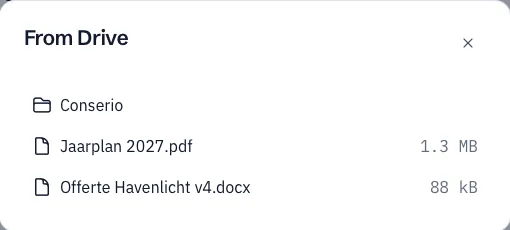
If not every member can open the file, Conserio asks, for example 3 members cannot open this file. Give access?, with the names. Choose Give access, or Share anyway to share it without extra access.
Without Team Drive
Sharing files is only possible when your company has Team Drive. Without Team Drive, the paperclip shows a short explanation: File sharing works through Team Drive.
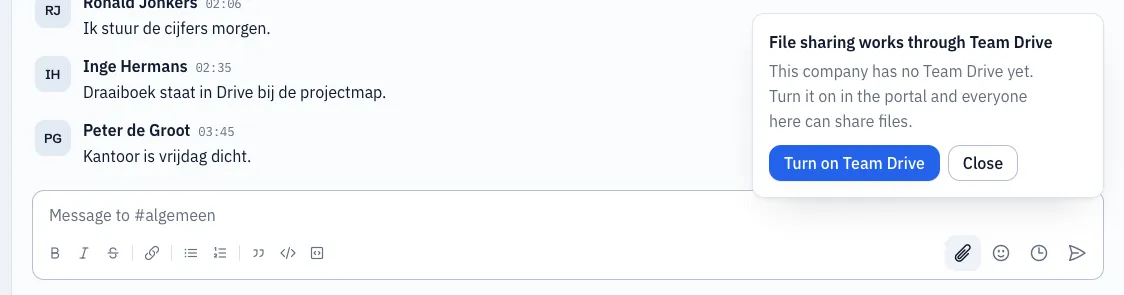
- If you are an administrator, you see Turn on Team Drive. That opens the Workspace portal, where you switch Team Drive on.
- Otherwise it says you can ask your administrator.
As soon as Team Drive is on, everyone in the company can share files. Conserio picks that up by itself at the next connection.
Receiving files from outside
If a conversation includes someone from outside your company, such as a guest, they can send a file too, as long as your company has Team Drive. The file goes straight into your Team Drive, in the folder Ontvangen in Conserio (Received in Conserio) of that conversation. It does not pass through the Conserio server.
The card of such a file says Received from outside.

Retention period
Your administrator can set how long received files are kept. The card then says kept until with the date. After that date Drive removes the file and the card says Removed by Drive.
Files shared by your own colleagues are not affected by this period.
On your phone
On your phone you see the file cards and open files in Drive. Sharing is not possible there yet.