

































Settings
Devices and signing out
See where you are signed in, sign out a device remotely and remove an account from this computer.
Applies to: macOS, Windows
This manual is available in English and Dutch.
Devices
In Preferences, tab Devices, you see per company the devices you are signed in on, with the kind of device and when it was last active. This computer is listed as This device.
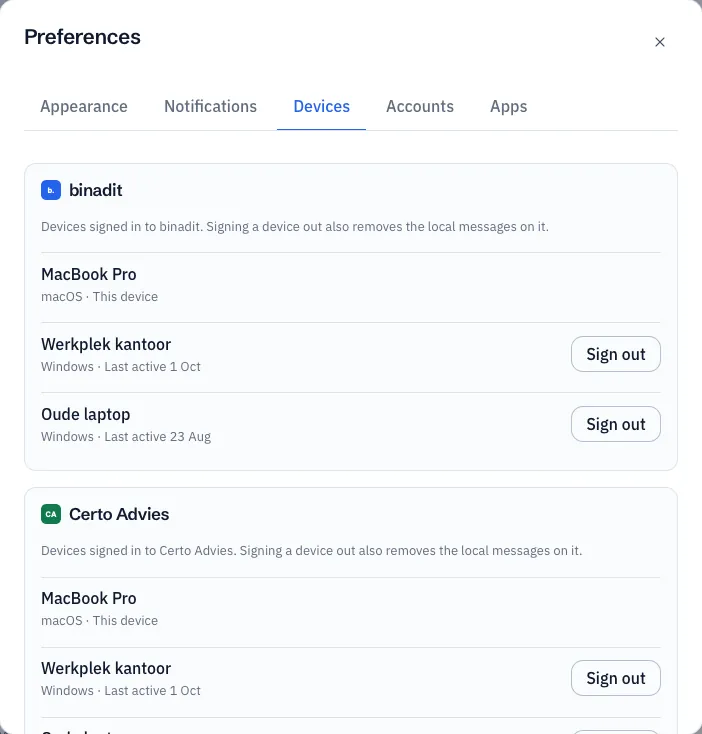
Lost a laptop or phone, or no longer use a device? Choose Sign out next to that device and confirm. Conserio on that device stops within a second, or as soon as it connects again, and removes the messages it stored.
Your administrator can also sign out devices, for example when you leave the company.
Remove an account from this computer
In Preferences, tab Accounts, you see your accounts with their e-mail address. Sign out removes an account and its messages from this computer. Your other accounts keep working.
You can also do this from the account menu at the top of the sidebar: Sign out. Conserio asks for confirmation first.
If you want to use the account again later, add it again. Your messages are on the server and come back.