

































Working in Conserio
Calls with Meet
Start a call from a channel or direct message, answer, decline with a quick reply, and the call card.
Applies to: macOS, Windows
This manual is available in English and Dutch.
Calls go through Meet, the video calling of Workspace. The call opens in your browser, because Meet is sure to get your camera and microphone there.
Start a call
Choose the camera (Start Meet) at the top right of a conversation, or press Cmd+Shift+M
(macOS) or Ctrl+Shift+M (Windows).
- Meet opens in your browser, with you as the organiser.
- A card with Join appears in the conversation, so the others can come in.
- In a direct message or group conversation the call also rings for the others, on all their computers where Conserio runs.
- In a channel nothing rings: the card is the invitation.
Being called
When someone calls you in a direct message or group conversation, Conserio shows is calling at the top right, with the name and the company.
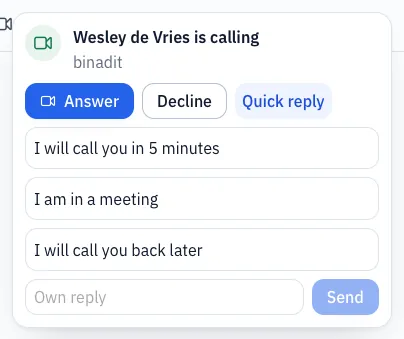
- Answer opens the call in your browser.
- Decline stops the ringing. The caller sees is not answering.
- Quick reply declines with a short text: I will call you in 5 minutes, I am in a meeting, I will call you back later, or an Own reply. The caller sees your text.
If nobody answers, the ringing stops after 45 seconds. You see Missed call from and the name; the caller sees No answer.
The call card
The card in the conversation says who started the call and when, for example Started by Wesley at 14:02 (on another day with the date), and has Join. Everyone in the conversation joins with it, also those who come later. Conserio does not yet know when a call in Meet ends, so the card never says the call is still running. Once Meet reports the end, it says Ended and Join goes away.