

































Settings
Notifications
Notifications per company, do not disturb, working hours, keywords, notifications per conversation and the mail digest.
Applies to: macOS, Windows
This manual is available in English and Dutch.
Conserio shows a notification from your computer for new messages that concern you. The title always names the company first and then the conversation, for example Certo Advies: #sales. Click the notification to open the conversation. On macOS you can also reply straight from the notification with Reply; on Windows a click on the notification opens the conversation and you reply there, because a Conserio notification on Windows has no reply field (yet).
Everything is in Preferences, tab Notifications, per account.
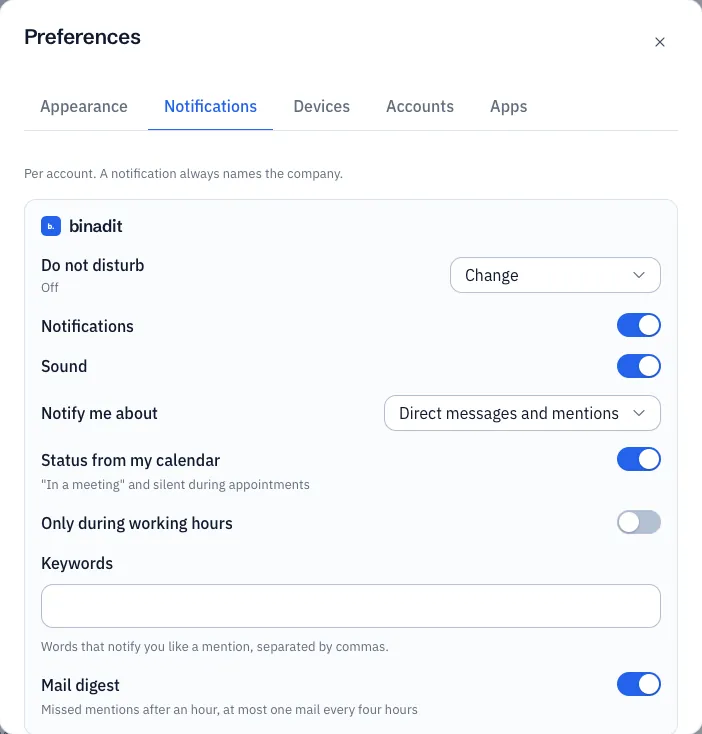
Per company
| Setting | What it does |
|---|---|
| Do not disturb | No notifications until a moment you choose: For one hour, Until tomorrow 09:00 or Until Monday 09:00. Switch off ends it. Above it you see until when it runs. |
| Notifications | Turns the notifications of this company on or off. |
| Sound | A sound with each notification. |
| Notify me about | All messages, Direct messages and mentions or Nothing. Applies to conversations for which you did not choose otherwise. |
| Status from my calendar | Silent during appointments in your calendar, see Calendar. |
| Only during working hours | Notifications only on the days and between the times you choose. By default Monday to Friday, 09:00 to 17:30. |
| Do not disturb outside working hours on all your devices | Appears when you set working hours. Outside your working hours your phone gets no notifications either, until your working hours start again. Conserio on this computer switches it on when your working hours end. |
| Keywords | Words that notify you like a mention, separated by commas. For example your last name or the name of a customer. |
| Mail digest | If you have not read a mention for an hour, you get a mail with what you missed. At most one mail every four hours. Only appears when your company allows the digest. |
Do not disturb, Keywords and Mail digest apply on all your devices. The other settings apply on this computer.
Per conversation
With the bell at the top right of a conversation you choose All messages, Direct messages and mentions or Nothing for that one conversation, or mute it. See Channels and conversations.
What counts as a mention
- Your name with
@. - A user group you are in.
@herewhen you are active, and@channel(in Dutch@hierand@kanaal).- One of your keywords.
- Every message in a direct message or group conversation.
Notifications on your phone
Your phone gets a push notification when you have not been active on any of your computers for the last two minutes. While you work at your computer, your phone stays quiet. See Mobile apps.